California Coast LUTs & Presets
Elevate your photos and videos with California Coast’s premium color tools.
Our collection of LUTs (Look-
Up Tables) and Lightroom Presets brings the iconic West Coast look – sun-drenched beaches, golden hour warmth, and vibrant city energy – to your work. Whether you’re a beginner or a seasoned pro, our products streamline editing and help you achieve a polished, cinematic style in seconds.
What Are LUTs and Presets?
Key Difference
LUTs focus on color and tone only, while presets adjust a broader range of settings. As one expert notes: A LUT essentially changes only two
specific aspects of an image: color and tone. A preset allows you to change a far
wider variety of image characteristics, including exposure, sharpness, and vignetting. In short, use LUTs when you want to fine-tune the cinematic color grade of video footage, and use presets to streamline photo editing or overall project looks by tweaking exposure, contrast, and more in one step.
LUTs vs. Presets: Which Should You Use?
Use LUTs
Use LUTs when color grading video. If you’re editing footage in Premiere Pro, Final Cut Pro X, DaVinci Resolve or similar, apply a LUT to give your scene a specific cinematic style. LUTs are ideal for setting a mood: e.g. teal-and-orange tones for Hollywood flair or soft warm hues for a romantic sunset. They offer precise control over color adjustments and deliver a consistent style across all clips.
Use Presets
Use Presets for photos or overall edits. If you’re working in Lightroom (Classic or CC), a preset quickly adjusts brightness, contrast, color balance, and more. This is perfect for batch editing a wedding album or travel gallery with one click. Presets provide a quick and convenient way to apply a consistent look or style to many images.
Beginners and Pros:
Both tools save you time. LUTs and presets let novices get stunning results instantly, while professionals can fine-tune each look. You can even mix both: start with a LUT for base tone, then tweak exposure/contrast with presets or manual edits.
Inspired by California’s Coast and Culture
Our color collections capture the sun-kissed, dreamy feel of California’s beaches and cityscapes. Think warm golden-hour light on Pacific shores, the cool blue of Catalina’s waters, the cozy browns of wine-country vineyards, and the vibrant energy of downtown Los Angeles. As one similar preset pack describes it, this is a light and dreamy coastal California aesthetic.
Whether it’s a wedding in Big Sur, a corporate interview in Hollywood, or a lifestyle shoot in San Diego, California Coast LUTs & Presets give your content that signature Western vibe. We draw inspiration from wedding cinematographers, film crews, and commercial photographers who work California events.
For example:
Sun-Drenched Romance
Capture golden glows in weddings with soft, creamy light and warm skin tones.
Urban Edge
Emulate the bold, high-contrast look of LA streets or Hollywood
nightlife.
Natural Beauty
Enhance landscapes and outdoor scenes with vivid yet organic colors – from the redwoods to the Riviera.
Cinematic Feel
Add a polished, magazine-quality finish to interviews and corporate films, balancing skin tones and light to look professional yet vibrant.
Our Collections: LUTs & Presets
Below are all 14 individual California Coast packs (plus our all-inclusive bundle). Each LUT Collection (video) includes 10 .CUBE LUT files plus one Sony S-Log-to-Rec709 conversion LUT. Each Preset Collection (for .XMP Lightroom presets) includes 6 .XMP files.
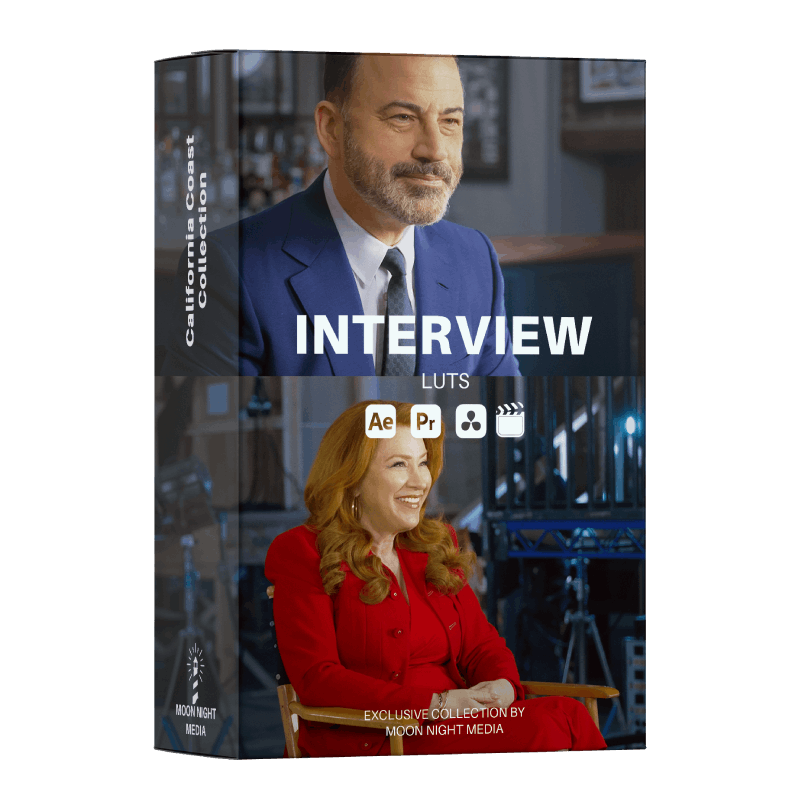
Interview Collection (LUTs)
A clean, neutral grade tailored for talking-heads and corporate videos. These LUTs keep skin tones natural and colors balanced for a polished, professional look in interviews with business owners or celebrities. Ideal for documentaries and corporate profiles, it minimizes harsh shadows and distracting tints so your subject looks their best.
Wedding Collection (Presets)
A soft, dreamy look for weddings and romantic events. This preset pack gently brightens whites and pastels, enriches skin tones, and adds a touch of cinematic warmth. It’s perfect for bridal portraits, ceremony photos, and highlights that feel timeless and golden-hued, capturing the magic of big days.
Hollywood Lights Collection (LUTs)
Inspired by the glitz of Tinseltown, these LUTs add bright, vibrant color and glow to your footage. Reds pop, highlights glow, and contrast is bumped for that star-lit intensity. Use it on nightlife, music videos, or event recaps to make city lights twinkle and people stand out with a glamorous Hollywood shimmer.
Downtown Vibes Collection (LUTs)
Channels the energy of urban California scenes. High-contrast and punchy, with deep shadows and bold highlights, these LUTs give a gritty-yet-stylish vibe. Perfect for street photography, city skate vids, or dynamic corporate promos shot against city backdrops. Think sharp blacks, teal-tinged shadows, and a lively pop to bright areas.
Technical Compatibility
Our LUTs and Presets are designed to work across industry-standard
software.
Key details:
LUT Files ( .CUBE ):
Each LUT Collection comes with 10 .CUBE files plus a Sony S-Log2 to Rec.709 conversion LUT. The .CUBE format is standard for color grading and is compatible with Adobe Premiere Pro, Final Cut Pro X, DaVinci Resolve, and most major video editing software.
(Simply import the LUT and apply it as a color effect in your timeline.)
Preset Files ( .XMP ):
Each Preset Collection includes 6 .XMP files. XMP presets are the current format for Adobe Lightroom Classic (desktop) and Lightroom CC, and also work in Photoshop Camera Raw.
Import these presets into Lightroom to apply our looks to your photos with one click.
Quick Installation
For LUTs, just add the .CUBE files to your editor’s LUT folder or use the “Import LUT” feature. For Presets, copy the .XMP into Lightroom’s Presets folder or use the “Import Presets” option. With our intuitive installation, you’ll see the new looks appear alongside Lightroom’s default presets and Premiere’s Lumetri color effects.
Each product also includes a brief help guide so you can start using the looks
immediately. All color profiles
are professionally calibrated, ensuring consistent results across projects.
With California Coast LUTs & Presets, you get professional-grade color tools that are easy to use and inspired by the Golden State’s beauty. Transform your visual content with sunlit warmth, vibrant city tones, or soft romantic hues – all while saving hours of editing work. Elevate every wedding video, corporate promo, or travel photo with a signature California style.
With California Coast LUTs & Presets, you get professional-grade color tools that are easy to use and inspired by the Golden State’s beauty. Transform your visual content with sunlit warmth, vibrant city tones, or soft romantic hues – all while saving hours of editing work. Elevate every wedding video, corporate promo, or travel photo with a signature California style.